Skip to header Skip to main navigation Skip to main content Skip to footer

User account menu

  • Log in
Amaël BERTEAU
Software Craftsman & Maker

Main navigation

  • Home
  • News
  • Software Engineering
  • Maker
  • Entrepreneuriat
  • Misc
  • Personal Projects
    • Bio
    • Curriculum Vitae
    • Skills
    • Likes
    • My Values
    • Quotes
    • Favorite Books
    • Favorite Tools

Manually install the SAP package on the Tizen 4 emulator

Breadcrumb

  • Home
  • Software Engineering
  • Manually install the SAP package on the Tizen 4 emulator

Software Engineering

  • Agile
  • Concepts / Practices
  • Architecture / Design
  • Implementation
  • Tools
    • FR
    • EN
By aberteau | 12:20 PM CEST, Sat June 06, 2020

After adding the sap package on the Tizen 4 emulator, you may get the following error message :

Extra package installation is failed. sap must be installed MANUALLY.
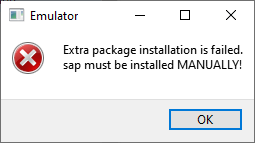
Extra package installation is failed. sap must be installed MANUALLY

  • Extra package installation is failed. sap must be installed MANUALLY!
    https://github.com/Samsung/Tizen.NET/issues/54
  • Wearable 4.0: Extra package installation is failed! Sap must be installed Manually!
    https://forum.developer.samsung.com/t/wearable-4-0-extra-package-installation-is-failed-sap-must-be-installed-manually/2498

Procedure

  1. Copy packages from the host computer to the target.
    > sdb push [tizen_sdk_path]\platforms\tizen-4.0\wearable\emulator-images\add-ons\sap /tmp/.emulator/apps/sap

  2. Switch to root mode
    > sdb root on

  3. Remount filesystem as Read/Write
    > sdb shell mount -o rw,remount /

  4. Install sap
    > sdb shell rpm -Uvh /tmp/.emulator/apps/sap/sap-1.9.5-0.i686.rpm

After emulator reboot, AccessoryService Emulator on Android Device is connected.

Tizen
Samsung Accessory Protocol

Footer menu

  • Contact

Copyright © 2026 Amael BERTEAU - All rights reserved